Pose Tool 3D
Riven PhoenixComics
4.1331.00 Reviews
- Version
- 6.8.181
- Installs
- 10.00K
- Age Rating
- Everyone
Screenshots
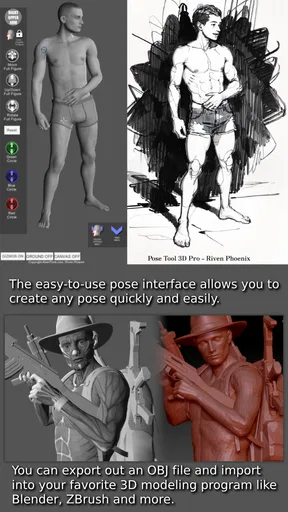
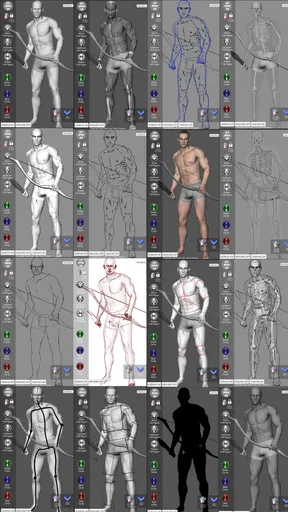
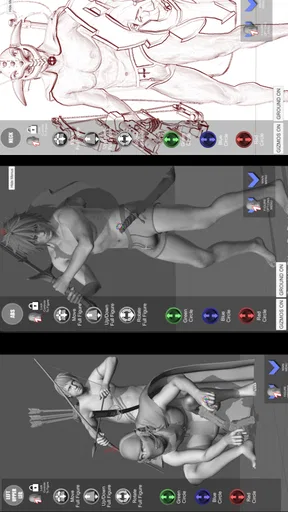
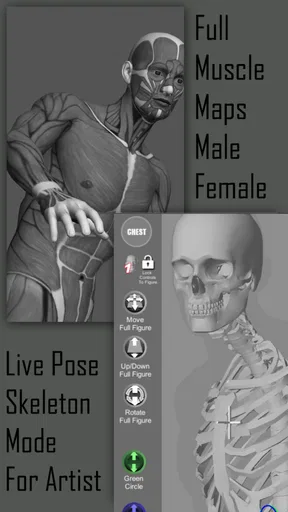
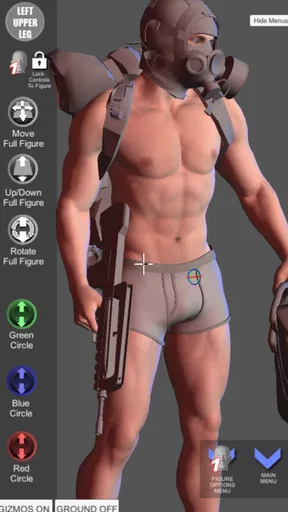
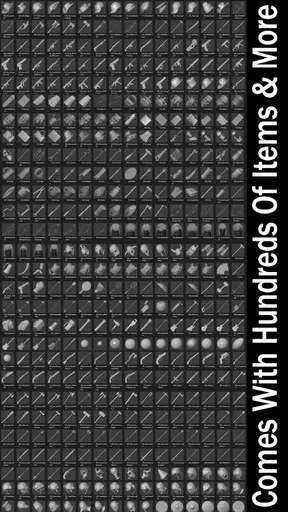
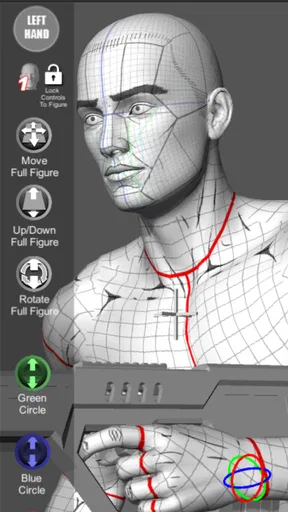
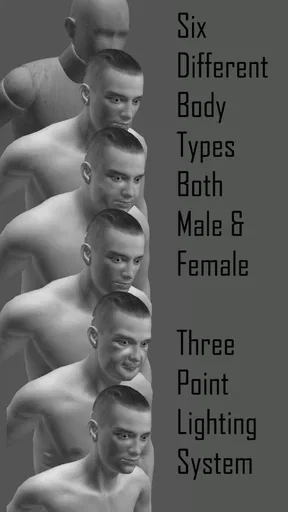
Our Review of Pose Tool 3D
 Analysis by Appyee
When I’m drawing a figure and the pose keeps looking stiff, I want a reference I can turn and inspect rather than another flat image to imitate. That’s the practical appeal of Pose Tool 3D: it gives artists a movable human-form reference for working out a pose before committing to a sketch. I’d treat it as a drawing aid, not a substitute for observing real people or learning anatomy from multiple sources. That distinction matters, especially when a convenient digital model starts to feel like an authority.
A reference tool, not a measure of trust
Pose Tool 3D is a paid comics-category app from developer Riven Phoenix. It costs $6.99, has an Everyone age rating, and shows a 4.0 average from around 1,600 ratings. Those details help set expectations, but they don’t tell me how the app handles information behind the scenes. I wouldn’t take a rating or a polished-looking model as evidence of privacy practices; I’d make decisions based on the choices the app actually presents on my device.
For an artist, the most useful trust question is often a modest one: what am I putting into the app, and what do I need to keep? A pose reference can be used without entering personal details into the creative work itself. If I’m planning a private project, I can keep the app’s role narrow—use it to check a silhouette or a limb angle, then make the drawing in my usual workspace. That keeps the reference task separate from notes, client material, or other sensitive content.
Check the choices that appear on your device
I’d review the permissions and any prompts shown during setup or use, rather than assuming what access is required. Grant only what makes sense for the action I’m trying to take, and revisit device settings if a request seems unrelated to posing or viewing a model. The same goes for account controls: I’d look at the options the app itself offers before deciding whether an account is needed for my workflow, and avoid entering information that isn’t necessary for the task.
This isn’t a reason to be suspicious of a drawing reference app; it’s simply a better habit than treating every prompt as a formality. A permission can affect what the app can access on a device, while an account choice can affect how convenient it is to carry work between sessions. I’d make those decisions deliberately, especially on a shared tablet or a device used for both personal and professional work.
Keep sensitive work in the right place
Pose references can become part of a larger workflow: a character study, a client draft, or a page that has not been announced yet. I’d avoid putting confidential names or project details into any optional fields unless there’s a clear reason, and I’d keep important finished drawings in the art app or storage location I already trust. A pose tool is most useful as a visual staging area; it doesn’t need to become the home for every part of a project.
There’s also a creative reason to keep that boundary. A 3D mannequin can help me test balance and viewing angle, but it can’t decide what expression, clothing, or story detail belongs in the final image. I use it to answer a narrow question—“does this arm read from this angle?”—then return to drawing. That way the reference supports my judgement instead of replacing it.
Using the model as a drawing reference
From the moment I opened Pose Tool 3D, I was greeted with an intuitive interface that feels both powerful and approachable. The app offers a variety of models, including male, female, and even animal figures. What’s really cool is the ability to adjust these models with an impressive range of movements and poses. It's like having a digital mannequin right at your fingertips!
One of the standout features is the ability to manipulate lighting and shadows. This is a boon for artists who want to understand how light interacts with the human form. You can adjust the intensity and angle of the light source, providing a realistic touch to your digital sketches.
Customization and Control
The app doesn't just stop at basic poses. You can customize the proportions of the models to match your specific artistic needs. This level of control is particularly useful for character designers who want to create unique and diverse characters. The precision is astonishing, and it gives you the freedom to explore creativity without limitations.
It’s worth mentioning the app’s user-friendly controls. Even if you're not tech-savvy, you’ll find yourself navigating through the options with ease. The pinch-to-zoom feature is smooth and allows for detailed adjustments, which is essential for capturing intricate details.
Make a pose useful on the page
A practical way to use the adjustable figure is to start with the action, not the anatomy. I’d rough in the largest directional line first—where the torso leans and where the weight seems to fall—then move the limbs to support that gesture. Only after the silhouette reads clearly would I zoom in to inspect a hand, knee, or shoulder. This order prevents a common trap: spending time perfecting small joints while the whole pose still feels unbalanced.
Lighting is most helpful when I use it to clarify form rather than to imitate a finished scene. I can rotate or adjust the light to see where the torso turns away, then simplify those changes into a few shadow shapes on paper. If I copy every modeled shadow literally, the drawing may look stiff or over-rendered. Treating the light as a study prompt gives me more control over the final style.
The proportion controls also call for judgement. They can help when I’m designing a deliberately stylized character, but a changed mannequin is no longer a neutral guide to ordinary anatomy. I’d make a quick note of what I altered before using the pose for a second character, so an exaggerated limb or torso doesn’t quietly become my default reference. The app can support consistency, but the artist still has to decide what “consistent” means.
Learning and Inspiration
Beyond being a tool for creating art, Pose Tool 3D serves as a fantastic learning resource. For those trying to grasp the nuances of human anatomy, the app offers an educational experience. I found myself spending time just rotating and examining the models, learning about muscle groups and bone structure. It’s like having a personal anatomy class in your pocket!
Plus, the app comes with a library of pre-made poses, which is a great source of inspiration. Whether you’re stuck in a creative rut or just need a starting point, these presets can spark new ideas and help you get the creative juices flowing.
Where it fits among other references
Compared with searching for a photo, a 3D mannequin’s chief advantage is control over the viewing angle: I can inspect the same arrangement from a different side instead of hunting for a matching photograph. That makes the app especially handy for a quick composition check or a pose that is difficult to find in a reference folder. A photo, however, preserves the subtle weight, fabric, facial expression, and unevenness of a real person better than a simplified model can.
Compared with drawing directly from imagination, a movable model can expose awkward limb placement before I build a whole panel around it. But the convenience has a cost: mannequins tend to encourage clean, readable poses, while expressive action often depends on asymmetry, foreshortening, and details that a generic figure won’t supply. For character work, I’d combine the tool with gesture sketches, personal observation, or photo references rather than asking it to carry the whole job.
It is a stronger fit for comic artists, illustrators, and learners who benefit from rotating a pose while they draw. Someone who mainly needs lifelike facial expression, clothing folds, or a specific real-world activity may be better served by photography or live observation. Likewise, if I already draw convincing figures from imagination and rarely need to check angles, a dedicated 3D reference may add more steps than value.
A realistic desk-side workflow
Imagine I’m thumbnailing a comic scene during a short evening drawing session. The character has to reach across a table while turning toward someone off-panel, and my first sketch makes the shoulder and forearm hard to read. I can set up a rough mannequin pose, view it from the panel’s angle, and use the light to understand which planes face the viewer. Then I can draw a few quick thumbnails, changing the gesture and camera angle on paper instead of treating the first model setup as final.
That workflow is useful because the app answers a specific visual question without dictating the panel. I’d keep the pose rough, take the idea back to my drawing surface, and add the character’s clothing, expression, and personality myself. If I’m working on several figures, checking one pose at a time also helps me avoid losing the relationship between them; a technically clear mannequin pose can still feel wrong if the characters don’t seem to react to each other.
For a beginner, a good exercise is to use a preset as a starting point, draw the broad gesture, then rotate the model and sketch the same pose from another view. The goal isn’t to trace every contour. It’s to notice how the torso, pelvis, and limbs overlap as the viewpoint changes. That small comparison can teach more than copying a single front-facing outline, while still leaving room for the artist to simplify and exaggerate.
Performance and Compatibility
Running Pose Tool 3D on both Android and iOS, I was impressed with its performance. The app runs smoothly without any noticeable lag, even when manipulating multiple models. It's optimized well for both platforms, ensuring that artists can work seamlessly across devices.
However, one thing to keep in mind is that the app might require a bit of storage space, especially if you’re planning to save numerous custom poses. But hey, that's a small trade-off for all the functionality you’re getting!
Version, cost, and everyday expectations
The app was released on October 14, 2012, and its current version is 6.8.181. It has over 10,000 installs, which suggests that artists have found a reason to seek it out, though popularity alone doesn’t tell me whether it matches my own drawing habits. At $6.99, I’d think of it as a focused tool purchase: worthwhile if I expect to use adjustable figures regularly, harder to justify if I only need a reference once in a while.
Because the app is paid, I’d decide based on the kind of friction it removes. If I repeatedly pause to search for a matching pose or struggle to understand a foreshortened limb, having a model ready to adjust could save time and help me keep drawing. If my usual reference folder already covers those needs, or I prefer the natural irregularity of photographs, the purchase may not change much. The best test is whether a movable figure solves a recurring problem, not whether it offers more controls in theory.
For people wondering whether it is suitable for younger artists, the app’s content rating is Everyone. That makes the stated age classification broad, but I’d still make the same practical decision I would with any art tool: consider the device, the artist’s needs, and any prompts or settings shown during use. The classification is not a substitute for checking the experience directly.
What I would check before relying on it
If I planned to use the app for a class or client deadline, I’d first spend a short practice session learning how to move the model, adjust the view, and reach the controls I need. A few minutes of familiarization can prevent a pose experiment from interrupting a drawing session. I’d also test whether my preferred workflow for saving or revisiting work suits me before building a large project around custom setups.
That is especially sensible on a tablet shared with family or colleagues. I’d check the visible account and permission choices, keep private project notes elsewhere, and make sure any reference I need later is preserved in a form that fits my own workflow. These are simple habits, not claims about hidden app behavior; they leave me in control of what I choose to share or store.
My cautious verdict
All in all, Pose Tool 3D is a must-have for any artist looking to enhance their understanding of human anatomy and improve their figure drawing skills. It’s not just a tool; it’s a creative partner that offers endless possibilities. Whether you’re sketching for fun or working on a professional project, this app will prove invaluable. So go ahead, give it a try and see how it transforms your artistic journey!
My recommendation is more measured: I’d consider it a useful, specialized reference if I regularly need to change a figure’s pose or viewing angle, and I’d pair it with real-world observation for details a mannequin can’t teach. Its strongest value is making a visual problem easier to inspect; it does not remove the need to draw, edit, or make artistic choices. Artists who want expressive photo reference or a complete anatomy course should look elsewhere for those particular needs.
For me, the sensible approach is to try a small task first: choose a pose that normally slows me down, use the model to check one or two angles, and see whether that makes the sketch clearer. I’d also make deliberate choices about permissions, accounts, and where project material belongs on my device. If the app fits that focused role, it can earn a place in an art workflow; if it adds more management than insight, a photograph or a quick gesture study is likely the better answer.
Verdict
Strengths of Pose Tool 3D
- Intuitive interface for easy navigation.
- Wide range of poses and models available.
- Customizable lighting and shadows.
- Supports both 2D and 3D models.
- Regular updates with new features.
Limitations of Pose Tool 3D
- Limited free version features.
- Occasional lag on older devices.
- Some advanced tools are complex.
- Requires internet for full functionality.
- In-app purchases can add up.
Similar Picks in This Category
View All
WEBTOON: Manga, Comics, Manhwa
NAVER WEBTOON4.6

MangaToon: Comic & Manga
MangaToon4.3

네이버 웹툰 - Naver Webtoon
NAVER WEBTOON4.3

Tapas – Comics and Novels
Tapas Entertainment Inc.4.2

Lezhin Comics - Daily Releases
LEZHIN ENTERTAINMENT3.3

WebComics - Webtoon & Manga
WEBCOMICS HOLDINGS HK LIMITED4.4
Frequently Asked Questions
What is Pose Tool 3D and how can it benefit artists?
Pose Tool 3D is a digital application designed to assist artists in visualizing human and animal anatomy through 3D models. It offers adjustable poses, lighting, and perspective options, making it easier for artists to study and replicate complex poses in their artwork. This tool is particularly useful for illustrators, animators, and anyone interested in improving their figure drawing skills.
Does Pose Tool 3D require an internet connection to function?
Pose Tool 3D is primarily an offline application, meaning you can use its core features without an internet connection. However, occasional internet access may be required for updates or if you want to access any additional content that the developers might provide online. This makes the app highly convenient for use in various settings.
Is Pose Tool 3D suitable for beginners in drawing and anatomy studies?
Yes, Pose Tool 3D is designed to be user-friendly, making it suitable for both beginners and advanced artists. The app provides a wide range of pre-set poses and an intuitive interface that allows users to manipulate models easily. Beginners can learn anatomy and improve their drawing skills by experimenting with different angles and poses.
How customizable are the models in Pose Tool 3D?
The models in Pose Tool 3D are highly customizable. Users can adjust limbs, head, and other body parts to create unique poses. The app also allows changes in lighting and camera angles, offering a comprehensive tool for artists seeking to study or use specific poses in their work. This flexibility helps in creating accurate and dynamic compositions.
Can Pose Tool 3D be used on both Android and iOS devices?
Yes, Pose Tool 3D is available for both Android and iOS platforms. This cross-platform availability ensures that users can benefit from its features regardless of their preferred device. Be sure to check the app's compatibility with your device's operating system version to ensure optimal performance.
